Resume example
CAD Designer resume example
By the Resumade team · About our content
A CAD Designer resume must clear ATS filters on software names and certification codes while showing hiring managers that your drawings ship on time and within spec. This example does both with tool-specific language and bullets anchored to real project outcomes.
Template: Windsor
Read this resume as text
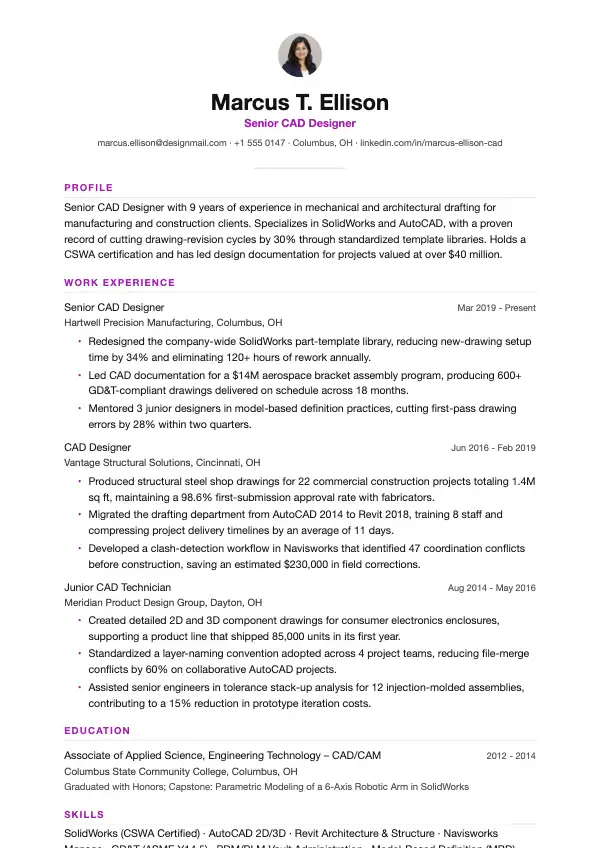
Marcus T. Ellison
Senior CAD Designer
marcus.ellison@designmail.com · +1 555 0147 · Columbus, OH · linkedin.com/in/marcus-ellison-cad
- Profile
- Senior CAD Designer with 9 years of experience in mechanical and architectural drafting for manufacturing and construction clients. Specializes in SolidWorks and AutoCAD, with a proven record of cutting drawing-revision cycles by 30% through standardized template libraries. Holds a CSWA certification and has led design documentation for projects valued at over $40 million.
- Work Experience
Senior CAD Designer
Hartwell Precision Manufacturing, Columbus, OH · Mar 2019 - Present
- Redesigned the company-wide SolidWorks part-template library, reducing new-drawing setup time by 34% and eliminating 120+ hours of rework annually.
- Led CAD documentation for a $14M aerospace bracket assembly program, producing 600+ GD&T-compliant drawings delivered on schedule across 18 months.
- Mentored 3 junior designers in model-based definition practices, cutting first-pass drawing errors by 28% within two quarters.
CAD Designer
Vantage Structural Solutions, Cincinnati, OH · Jun 2016 - Feb 2019
- Produced structural steel shop drawings for 22 commercial construction projects totaling 1.4M sq ft, maintaining a 98.6% first-submission approval rate with fabricators.
- Migrated the drafting department from AutoCAD 2014 to Revit 2018, training 8 staff and compressing project delivery timelines by an average of 11 days.
- Developed a clash-detection workflow in Navisworks that identified 47 coordination conflicts before construction, saving an estimated $230,000 in field corrections.
Junior CAD Technician
Meridian Product Design Group, Dayton, OH · Aug 2014 - May 2016
- Created detailed 2D and 3D component drawings for consumer electronics enclosures, supporting a product line that shipped 85,000 units in its first year.
- Standardized a layer-naming convention adopted across 4 project teams, reducing file-merge conflicts by 60% on collaborative AutoCAD projects.
- Assisted senior engineers in tolerance stack-up analysis for 12 injection-molded assemblies, contributing to a 15% reduction in prototype iteration costs.
- Education
Associate of Applied Science, Engineering Technology – CAD/CAM
Columbus State Community College, Columbus, OH · 2012 - 2014
Graduated with Honors; Capstone: Parametric Modeling of a 6-Axis Robotic Arm in SolidWorks
- Skills
- SolidWorks (CSWA Certified) · AutoCAD 2D/3D · Revit Architecture & Structure · Navisworks Manage · GD&T (ASME Y14.5) · PDM/PLM Vault Administration · Model-Based Definition (MBD) · Sheet Metal & Weldment Design · Tolerance Stack-Up Analysis
- Links
- Portfolio: marcusellison.myportfolio.com · LinkedIn: linkedin.com/in/marcus-ellison-cad
What makes this resume work
- Every bullet opens with a strong action verb and closes with a quantified result — percentages, dollar figures, or unit counts — so hiring managers can gauge impact at a glance without reading between the lines.
- Software names appear exactly as recruiters type them into ATS searches (SolidWorks, AutoCAD, Revit, Navisworks), and the CSWA certification is called out in both the skills section and the summary to maximize keyword density without keyword stuffing.
- The summary front-loads seniority level and years of experience in the first clause, letting a quick skim answer the most basic screening question before the reader reaches a single bullet point.
- The education note on the capstone project replaces a generic GPA line with domain-relevant proof of technical depth, which matters when a degree is an AAS rather than a four-year engineering credential.
Keywords that help you pass the ATS
Work the ones that fit your experience into your resume, naturally, not stuffed.
How to write a CAD Designer resume
Choose the right format for a CAD Designer resume
Use a reverse-chronological format unless you are switching industries or have fewer than two years of experience, in which case a combination format works better. CAD Designer roles are highly technical, so your resume needs a clean single-column or two-column layout that passes applicant tracking systems (ATS) without losing formatting — avoid tables, text boxes, or graphics that embed text.
Keep the resume to one page if you have under ten years of experience; two pages are acceptable for senior designers or those with a broad portfolio of industries such as aerospace, civil, and consumer products. Always save and submit as a PDF unless the job posting explicitly asks for a Word file.
- Place a dedicated 'Technical Skills' section near the top so ATS and hiring managers spot your software stack immediately
- Use standard section headings: Summary, Experience, Skills, Education, Certifications
- Set margins to 0.5–0.75 inches and font size to 10–12pt for readability
- Include a portfolio or GitHub link (for parametric or script-driven CAD work) in the header alongside your LinkedIn URL
Write a professional summary that shows your CAD specialty
Your summary should be three to four sentences that name your CAD platform expertise, the industry you work in, and one or two quantifiable wins. Generic summaries like 'detail-oriented professional' waste space. Recruiters give this section a quick first scan, so lead with your strongest credential.
Example: "Mechanical CAD Designer with 7 years of experience in SolidWorks and AutoCAD developing precision sheet-metal and injection-molded components for medical device OEMs. Reduced design-cycle time by 22% at Medline Industries by standardizing part libraries and implementing top-down assembly modeling. CSWA certified; experienced collaborating with manufacturing engineers through DFM reviews and GD&T-compliant drawing packages."
Write work-experience bullets that prove impact with numbers
Each bullet should follow an action-verb → task → result structure. Quantify output wherever possible: number of parts modeled, reduction in revision cycles, file size or render time improvements, or cost savings from design changes. Avoid passive phrasing like 'responsible for creating drawings' — own the outcome.
Tie your bullets to real deliverables: released drawings, ECO packages, tolerance analyses, FEA setups, or vendor RFQs. Hiring managers for CAD roles want to see that you understand the full product-development workflow, not just that you can operate software.
- Modeled 340+ production parts in CATIA V5 for a Tier-1 automotive supplier, achieving a 15% reduction in engineering change orders through early clash-detection reviews
- Developed fully parametric Revit families for a commercial interiors firm, cutting drawing-production time from 4 hours to 45 minutes per project and eliminating a recurring $12,000 annual drafting contract
Skills and certifications recruiters and ATS look for
List software by full name and version where relevant — 'SolidWorks 2023,' 'AutoCAD 2024,' 'CATIA V5/V6,' 'Inventor,' 'Creo Parametric,' 'Fusion 360,' 'Revit,' 'MicroStation.' Add complementary tools: PDM/PLM systems (Windchill, Vault, Teamcenter), simulation tools (ANSYS, SolidWorks Simulation), and rendering software (KeyShot, VRED) if you use them.
Certifications carry real weight in CAD hiring. List them with the issuing body and year. The most recognized credentials include Certified SolidWorks Associate (CSWA), Certified SolidWorks Professional (CSWP), Autodesk Certified Professional (ACP) in AutoCAD or Inventor, and Revit Architecture Certified Professional for AEC roles. GD&T proficiency per ASME Y14.5-2018 is a hard skill, not a soft one — call it out explicitly.
- SolidWorks (CSWA, CSWP), CATIA V5, AutoCAD, Creo Parametric, Fusion 360
- PDM/PLM: SolidWorks PDM, Windchill, Teamcenter
- GD&T per ASME Y14.5-2018, tolerance stack-up analysis
- FEA/simulation: SolidWorks Simulation, ANSYS Mechanical (basic)
- Industry standards: ANSI, ISO, MIL-SPEC drawing standards
Education, licenses, and extras
Most CAD Designer roles require an Associate's or Bachelor's degree in Mechanical Engineering Technology, Mechanical Engineering, Industrial Design, Architecture (for BIM/Revit roles), or a related field. If you hold a two-year degree but have strong certifications and ten-plus years of experience, list experience first and education last. Do not omit your degree even if it is old.
Add a 'Portfolio' line in your Education or a standalone section with a direct URL to your work — Grabcad, Behance, a personal site, or a hosted PDF. For defense or aerospace roles, note active security clearances. If you have completed manufacturer-specific training (e.g., Dassault Systèmes official courseware, PTC University), list it under Certifications or Professional Development.
- Include graduation year; omit GPA unless it is above 3.5 and you graduated within the last three years
- List relevant coursework only if you are a recent graduate with limited work history
- Note any professional memberships: ASME, SME, AIA (for architectural CAD roles)
Mistakes to avoid
- Listing software as a vague block ('CAD software, 3D modeling') instead of naming every platform by its exact product name, which causes ATS keyword misses and signals shallow experience to reviewers.
- Omitting the industry context of your CAD work — a resume that says 'created 3D models' tells a hiring manager nothing about whether your tolerancing and drawing standards match their sector, whether aerospace, civil, or consumer goods.
- Skipping GD&T as an explicit skill, even though most mechanical CAD roles treat it as a baseline requirement and many ATS filters screen for 'GD&T' or 'ASME Y14.5' as standalone keywords.
- Forgetting to include a portfolio link, which is a near-universal expectation for CAD roles and the single fastest way to move from the callback pile to the interview pile.
Frequently asked questions
- Should a CAD Designer include a portfolio link on a resume?
- Yes, and it is expected rather than optional in most hiring processes. Place the URL in your resume header next to your LinkedIn profile. Make sure the link is publicly accessible and that the portfolio shows dimensioned drawings or assemblies, not just rendered images, so reviewers can assess your drafting standards.
- How important are CAD certifications like CSWA or CSWP compared to work experience?
- Work experience outweighs certifications at the mid-to-senior level, but certifications matter significantly for entry-level candidates and for roles where a specific platform is the primary tool. A CSWP signals genuine SolidWorks depth and can differentiate you when two candidates have similar job histories. List certifications with the issuing body and year earned.
- What is the right resume length for a CAD Designer with 12 years of experience?
- Two pages is appropriate at that experience level, especially if you have worked across multiple industries or platforms. Prioritize the most recent ten years and trim early-career roles to a single line each. Do not pad to fill the second page — a dense page-and-a-half is better than a sparse two pages.
Make it yours in minutes
Open this example in the builder, swap in your details, and export a clean, ATS-ready resume.
Once your resume is ready
More for this application
- Template style
- Designer resume templates