Resume example
Administrative Assistant resume example
By the Resumade team · About our content
An Administrative Assistant resume must clear ATS keyword filters and immediately show a hiring manager that you keep operations running without supervision. This example does both by pairing concrete tools with quantified outcomes in every bullet.
Template: Journal
Read this resume as text
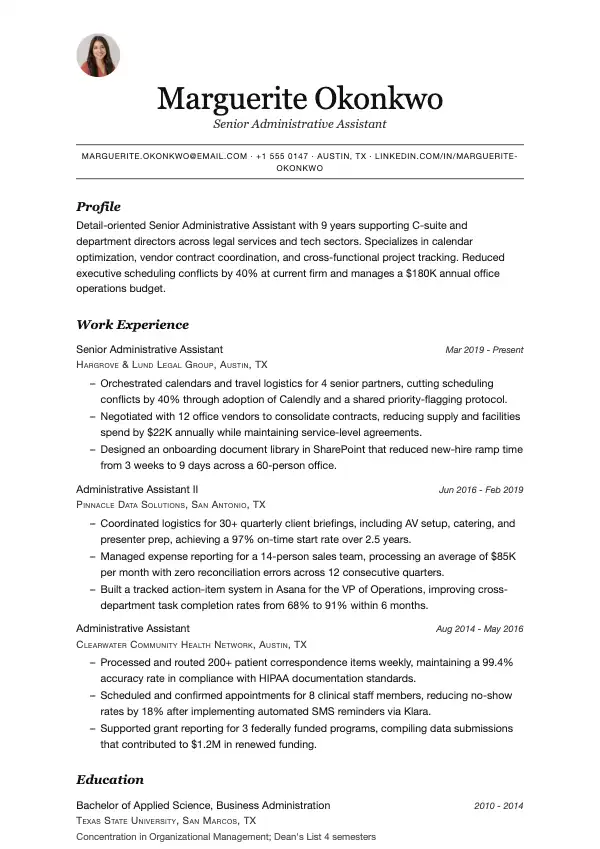
Marguerite Okonkwo
Senior Administrative Assistant
marguerite.okonkwo@email.com · +1 555 0147 · Austin, TX · linkedin.com/in/marguerite-okonkwo
- Profile
- Detail-oriented Senior Administrative Assistant with 9 years supporting C-suite and department directors across legal services and tech sectors. Specializes in calendar optimization, vendor contract coordination, and cross-functional project tracking. Reduced executive scheduling conflicts by 40% at current firm and manages a $180K annual office operations budget.
- Work Experience
Senior Administrative Assistant
Hargrove & Lund Legal Group, Austin, TX · Mar 2019 - Present
- Orchestrated calendars and travel logistics for 4 senior partners, cutting scheduling conflicts by 40% through adoption of Calendly and a shared priority-flagging protocol.
- Negotiated with 12 office vendors to consolidate contracts, reducing supply and facilities spend by $22K annually while maintaining service-level agreements.
- Designed an onboarding document library in SharePoint that reduced new-hire ramp time from 3 weeks to 9 days across a 60-person office.
Administrative Assistant II
Pinnacle Data Solutions, San Antonio, TX · Jun 2016 - Feb 2019
- Coordinated logistics for 30+ quarterly client briefings, including AV setup, catering, and presenter prep, achieving a 97% on-time start rate over 2.5 years.
- Managed expense reporting for a 14-person sales team, processing an average of $85K per month with zero reconciliation errors across 12 consecutive quarters.
- Built a tracked action-item system in Asana for the VP of Operations, improving cross-department task completion rates from 68% to 91% within 6 months.
Administrative Assistant
Clearwater Community Health Network, Austin, TX · Aug 2014 - May 2016
- Processed and routed 200+ patient correspondence items weekly, maintaining a 99.4% accuracy rate in compliance with HIPAA documentation standards.
- Scheduled and confirmed appointments for 8 clinical staff members, reducing no-show rates by 18% after implementing automated SMS reminders via Klara.
- Supported grant reporting for 3 federally funded programs, compiling data submissions that contributed to $1.2M in renewed funding.
- Education
Bachelor of Applied Science, Business Administration
Texas State University, San Marcos, TX · 2010 - 2014
Concentration in Organizational Management; Dean's List 4 semesters
- Skills
- Microsoft 365 (Word, Excel, PowerPoint, Outlook) · SharePoint & OneDrive administration · Asana & Monday.com project tracking · Calendly & Google Workspace scheduling · Concur expense management · DocuSign & contract lifecycle coordination · Notary Public — State of Texas · HIPAA compliance documentation · Zoom & Teams meeting facilitation
- Links
- LinkedIn: linkedin.com/in/marguerite-okonkwo
What makes this resume work
- Every bullet opens with a strong action verb and closes with a number — percentages, dollar figures, or time saved — so hiring managers instantly see business impact rather than a list of duties.
- Skills are listed as specific tools and credentials (Asana, Concur, Notary Public) rather than vague categories, which maps directly to the terms recruiters enter into ATS search filters.
- The summary front-loads seniority, industry breadth, and two headline metrics in three sentences, giving a recruiter on a quick first scan a complete picture before reading further.
- Three roles across distinct industries — legal, tech, and healthcare — demonstrate adaptability while the consistent formatting keeps the document easy to skim, signaling strong organizational judgment.
Keywords that help you pass the ATS
Work the ones that fit your experience into your resume, naturally, not stuffed.
How to write an Administrative Assistant resume
Choose the right format for an Administrative Assistant resume
Most administrative assistant roles reward demonstrated experience over credentials, so a reverse-chronological format is the safest choice for anyone with at least one year of office work. Lead with your most recent position and work backward, keeping the document to one page if you have under ten years of experience and two pages only if every line earns its place.
Use clean, single-column layouts with clear section headers. Recruiters in this field often scan paper printouts or applicant-tracking systems that choke on tables, text boxes, and graphics, so avoid them entirely. Stick to standard fonts like Calibri or Arial at 10–12 pt, half-inch margins, and consistent date formatting throughout.
- Reverse-chronological order for most candidates; functional format only if you are re-entering the workforce after a gap of five or more years
- File format: follow the job posting; if it does not say, send a text-based PDF and keep a .docx ready in case an employer asks for Word
- Section order: Contact Info → Summary → Work Experience → Skills → Education → Certifications
- Keep file size under 2 MB; rename the file FirstName-LastName-AdminAssistant-Resume.pdf
Write a professional summary that lands interviews
Your summary sits at the top and does one job: convince a hiring manager in three sentences that you can handle their specific office. Name your years of experience, the environments you have worked in (legal, medical, corporate, nonprofit), and one or two concrete strengths that match the posting. Skip objective statements — they are about what you want, not what you deliver.
Example: "Detail-oriented Administrative Assistant with 6 years supporting C-suite executives in fast-paced financial services environments. Proficient in Microsoft 365, Salesforce, and Concur expense management; reduced calendar conflicts by 30% through a centralized scheduling protocol. Known for discreet handling of confidential documents and composing executive correspondence with minimal revision."
Write work-experience bullets that show impact
Every bullet should follow an action verb → task → result structure. Quantify wherever you can: number of executives supported, call volume handled, budget tracked, or time saved. Generic phrases like 'responsible for scheduling' tell a recruiter nothing; numbers and context tell them everything.
Pull keywords directly from the job description — terms like 'calendar management,' 'vendor coordination,' or 'accounts payable support' are often scanned by ATS before a human ever reads your resume.
- Coordinated travel and logistics for 4 senior vice presidents across 12 domestic and international trips per quarter, cutting booking errors by 40% after implementing a standardized travel-request form in SharePoint.
- Processed 150+ vendor invoices monthly in QuickBooks, reconciled discrepancies against purchase orders, and reduced late-payment fees by $8,400 annually by establishing a weekly AP review cycle.
Skills and certifications recruiters and ATS systems look for
Administrative assistant job postings cluster around a predictable set of hard skills. List the software you actually use by name — not just 'Microsoft Office' but the specific applications and, where relevant, your proficiency level. Soft skills like 'communication' and 'team player' belong in your bullets as demonstrated behavior, not in a standalone skills list.
Certifications carry real weight in this field. The most recognized are the Certified Administrative Professional (CAP) from the International Association of Administrative Professionals (IAAP), the Microsoft Office Specialist (MOS) certification, and the Professional Administrative Certificate of Excellence (PACE). In healthcare settings, a HIPAA compliance training certificate is often expected.
- Software: Microsoft 365 (Outlook, Word, Excel, PowerPoint, Teams), Google Workspace, Zoom, Slack, Asana, Trello, Salesforce, SAP Concur, QuickBooks, DocuSign
- Core competencies: calendar and travel management, meeting minutes, records management, budget tracking, vendor relations, front-desk operations, multi-line phone systems
- Certifications: CAP (IAAP), Microsoft Office Specialist (MOS), PACE, Notary Public commission (state-specific)
- Typing speed: include WPM if 60 or above — it is a concrete, verifiable data point many postings still request
Education, licenses, and extras that strengthen your application
An associate or bachelor's degree is preferred but rarely required for most administrative assistant roles outside of legal or executive-level positions. List your highest degree, the institution, and graduation year. If you did not finish a degree, list completed coursework or your diploma without a graduation year — do not fabricate dates.
Add a separate Certifications section below Education rather than burying credentials inside it. If you hold a Notary Public commission, list the state and expiration date — it is a genuine differentiator. Volunteer board secretary roles, professional association memberships like IAAP, or relevant continuing education through platforms like LinkedIn Learning are worth including if space allows and the experience is recent.
- List GPA only if 3.5 or above and within the last five years
- Include relevant coursework (business writing, office technology, accounting basics) if you are a recent graduate with limited experience
- Languages: list fluency level honestly — bilingual skills in Spanish, Mandarin, or ASL are frequently sought in administrative roles
Mistakes to avoid
- Using a generic skills list that says 'Microsoft Office' without specifying applications or proficiency level, which tells recruiters and ATS nothing actionable.
- Writing duty-based bullets like 'Answered phones and managed schedules' instead of quantified accomplishment statements that show the scope and result of your work.
- Omitting the name of the software platforms you used in each role, which keeps your resume out of the results when a recruiter searches for those tools.
- Listing an email address or LinkedIn URL that looks unprofessional or links to an incomplete profile, which undermines the organized, detail-oriented image an administrative assistant must project.
Frequently asked questions
- Should an administrative assistant resume be one page or two pages?
- One page is the standard for candidates with fewer than ten years of experience, and most hiring managers in this field expect it. Go to two pages only if you have extensive experience supporting senior executives across multiple industries and every bullet adds distinct value — padding to fill a second page will hurt more than help.
- What is the best way to show promotions or multiple roles at the same company on an administrative assistant resume?
- Stack the roles under one company header with the overall tenure at the top, then list each title and its dates beneath it. This format signals loyalty and growth without making the recruiter do math to figure out how long you were there. Write separate bullet sets for each role to show how your responsibilities expanded.
- Do I need a cover letter for an administrative assistant job application?
- Yes, in most cases — administrative assistant roles are relationship-driven, and a cover letter lets you demonstrate the professional writing and communication skills the job requires before you even walk in the door. Keep it to three short paragraphs: why this employer, what you bring, and a clear call to action. Match the tone to the company culture.
Make it yours in minutes
Open this example in the builder, swap in your details, and export a clean, ATS-ready resume.
Once your resume is ready
More for this application
- Cover letter example
- Administrative Assistant Cover Letter Example
- Template style
- ATS-Friendly resume templates