Resume example
Technical Support Specialist resume example
By the Resumade team · About our content
A Technical Support Specialist resume must clear ATS filters on tool names and certifications, then prove value to hiring managers through quantified impact. This example does both by weaving real metrics and platform-specific language into every section.
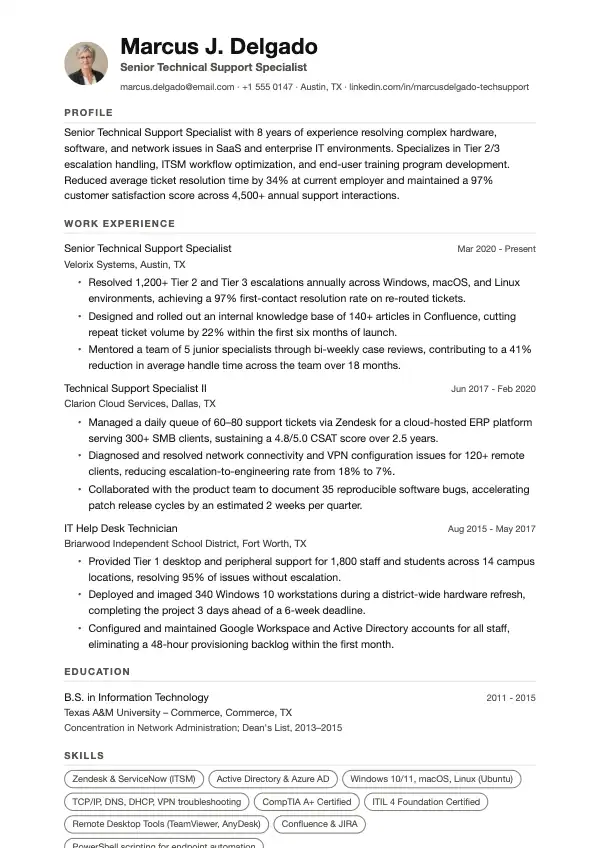
Template: Onyx
Read this resume as text
Marcus J. Delgado
Senior Technical Support Specialist
marcus.delgado@email.com · +1 555 0147 · Austin, TX · linkedin.com/in/marcusdelgado-techsupport
- Profile
- Senior Technical Support Specialist with 8 years of experience resolving complex hardware, software, and network issues in SaaS and enterprise IT environments. Specializes in Tier 2/3 escalation handling, ITSM workflow optimization, and end-user training program development. Reduced average ticket resolution time by 34% at current employer and maintained a 97% customer satisfaction score across 4,500+ annual support interactions.
- Work Experience
Senior Technical Support Specialist
Velorix Systems, Austin, TX · Mar 2020 - Present
- Resolved 1,200+ Tier 2 and Tier 3 escalations annually across Windows, macOS, and Linux environments, achieving a 97% first-contact resolution rate on re-routed tickets.
- Designed and rolled out an internal knowledge base of 140+ articles in Confluence, cutting repeat ticket volume by 22% within the first six months of launch.
- Mentored a team of 5 junior specialists through bi-weekly case reviews, contributing to a 41% reduction in average handle time across the team over 18 months.
Technical Support Specialist II
Clarion Cloud Services, Dallas, TX · Jun 2017 - Feb 2020
- Managed a daily queue of 60–80 support tickets via Zendesk for a cloud-hosted ERP platform serving 300+ SMB clients, sustaining a 4.8/5.0 CSAT score over 2.5 years.
- Diagnosed and resolved network connectivity and VPN configuration issues for 120+ remote clients, reducing escalation-to-engineering rate from 18% to 7%.
- Collaborated with the product team to document 35 reproducible software bugs, accelerating patch release cycles by an estimated 2 weeks per quarter.
IT Help Desk Technician
Briarwood Independent School District, Fort Worth, TX · Aug 2015 - May 2017
- Provided Tier 1 desktop and peripheral support for 1,800 staff and students across 14 campus locations, resolving 95% of issues without escalation.
- Deployed and imaged 340 Windows 10 workstations during a district-wide hardware refresh, completing the project 3 days ahead of a 6-week deadline.
- Configured and maintained Google Workspace and Active Directory accounts for all staff, eliminating a 48-hour provisioning backlog within the first month.
- Education
B.S. in Information Technology
Texas A&M University – Commerce, Commerce, TX · 2011 - 2015
Concentration in Network Administration; Dean's List, 2013–2015
- Skills
- Zendesk & ServiceNow (ITSM) · Active Directory & Azure AD · Windows 10/11, macOS, Linux (Ubuntu) · TCP/IP, DNS, DHCP, VPN troubleshooting · CompTIA A+ Certified · ITIL 4 Foundation Certified · Remote Desktop Tools (TeamViewer, AnyDesk) · Confluence & JIRA · PowerShell scripting for endpoint automation
- Links
- LinkedIn: linkedin.com/in/marcusdelgado-techsupport · Portfolio: marcusdelgado.io/support-portfolio
What makes this resume work
- The summary front-loads seniority, domain depth, and two headline numbers — a 34% resolution-time reduction and a 97% CSAT score — so a hiring manager gets the value proposition before reading a single bullet.
- Each bullet opens with a strong action verb and closes with a concrete result (percentages, ticket volumes, or time saved), making it easy for both ATS parsers and human reviewers to gauge actual performance.
- Skills are listed as specific tool-and-context pairs (e.g., 'Zendesk & ServiceNow (ITSM)') rather than vague categories, which matches the exact strings recruiters enter into applicant tracking searches.
- The knowledge-base project in the current role demonstrates proactive problem-solving beyond reactive support — a differentiator that signals readiness for a lead or team-lead promotion track.
Keywords that help you pass the ATS
Work the ones that fit your experience into your resume, naturally, not stuffed.
How to write a Technical Support Specialist resume
Choose the right format for a Technical Support Specialist resume
Use a reverse-chronological format unless you are switching careers or have fewer than two years of experience, in which case a hybrid format works better. Recruiters spend about seven seconds on a first scan (Ladders eye-tracking study, 2018), so keep your resume to one page if you have less than eight years of experience, and two pages maximum after that.
Use clean section headers, consistent font sizing (10–12 pt body, 14–16 pt name), and standard section labels like 'Work Experience' and 'Skills' so applicant tracking systems parse your resume correctly. Avoid tables, text boxes, and columns — many ATS platforms scramble them.
- One page for 0–7 years of experience; two pages for 8+ years
- Standard .docx or PDF format — check the job posting for preference
- Margins between 0.5 and 1 inch; no headers or footers containing critical contact info
- Separate sections for Technical Skills and Certifications rather than lumping them together
Write a professional summary that gets you past the first screen
Your summary sits at the top and functions as a 3–4 line pitch. Name your years of experience, your environment specialization (help desk Tier 1/2/3, desktop support, SaaS platforms, etc.), and one or two measurable achievements. Skip objectives — they tell the employer what you want, not what you deliver.
Example: "CompTIA A+ and ITIL 4 Foundation-certified Technical Support Specialist with 5 years resolving hardware, software, and network issues in a 2,000-seat Windows and Azure AD environment. Maintained a 94% first-call resolution rate and reduced average ticket handle time by 18% through self-service knowledge base development. Comfortable supporting remote and hybrid workforces using ServiceNow, Jira Service Management, and Zoom."
Write work-experience bullets that prove impact
Each bullet should follow an action verb + task + result structure. Quantify wherever possible: ticket volume, resolution rates, downtime reduced, user base supported, SLA compliance percentages. Avoid vague phrases like 'assisted users with technical issues' — they appear on every resume and tell a hiring manager nothing.
Pull metrics from your ticketing system reports, team dashboards, or performance reviews. Even rough numbers ('approximately 80 tickets per week') are more credible than no numbers at all.
- Resolved an average of 85 Tier 2 tickets per week across Windows 10/11, macOS, and iOS endpoints while maintaining a 96% SLA compliance rate in a 1,500-user enterprise environment.
- Built and maintained 40+ knowledge base articles in Confluence, reducing repeat Tier 1 escalations by 22% over six months and cutting average handle time from 14 minutes to 11 minutes.
Skills and certifications recruiters and ATS systems look for
Technical Support roles are heavily keyword-filtered. Match your skills section to the job description, but only list tools and platforms you can actually demonstrate. Separate hard technical skills from soft skills — recruiters and ATS treat them differently, and mixing them dilutes both.
Certifications carry real weight in this field. CompTIA A+, Network+, and Security+ are baseline expectations for many mid-level roles. ITIL 4 Foundation signals process maturity. Microsoft certifications (MD-102, AZ-900) are increasingly requested for Azure-heavy environments. Salesforce Certified Administrator is relevant if you support CRM platforms.
- Ticketing and ITSM: ServiceNow, Jira Service Management, Zendesk, Freshdesk, Remedy
- Operating systems: Windows 10/11, macOS Ventura/Sonoma, Ubuntu/RHEL basics
- Networking: TCP/IP, DNS, DHCP, VPN (Cisco AnyConnect, GlobalProtect), basic firewall troubleshooting
- Remote support tools: TeamViewer, BeyondTrust, Microsoft Remote Desktop, LogMeIn
- Certifications to list: CompTIA A+, Network+, Security+; ITIL 4 Foundation; Microsoft MD-102; HDI Support Center Analyst
Education, licenses, and extras that strengthen your resume
List your highest degree first with institution, degree name, and graduation year. A two-year associate degree in Information Technology or Computer Science is common and respected in this field — you do not need a four-year degree if your certifications and experience are strong. Omit high school once you have any post-secondary credential.
In an 'Additional' or 'Professional Development' section, include relevant bootcamps, LinkedIn Learning certificates tied to specific tools (e.g., ServiceNow Fundamentals), language skills if you support multilingual user bases, and active professional memberships like HDI or CompTIA communities. If you hold a current security clearance, list it prominently — it is a significant differentiator for government and defense contractor roles.
Mistakes to avoid
- Listing generic soft skills like 'good communicator' or 'team player' without any context or evidence wastes space that should go to tool names and metrics.
- Omitting version specifics for operating systems and software (e.g., writing 'Windows' instead of 'Windows 10/11') makes your resume harder to match against ATS keyword filters tied to specific environments.
- Using a functional or skills-based format to hide employment gaps often backfires because most technical support hiring managers and ATS systems are conditioned to distrust resumes that bury work history.
- Failing to tailor the certifications section to the job posting — listing an expired or entry-level cert prominently when the role requires ITIL or Microsoft credentials signals a mismatch before the phone screen.
Frequently asked questions
- Should I include a help desk resume objective or a summary?
- Use a professional summary, not an objective. An objective focuses on what you want from the employer; a summary focuses on what you bring to the role, which is what hiring managers care about. Keep it to three or four lines and anchor it with at least one concrete metric or certification.
- How important is CompTIA A+ for a Technical Support Specialist resume?
- CompTIA A+ is the most recognized baseline certification in desktop and help desk support, and many job postings list it as required or preferred for Tier 1 and Tier 2 roles. If you do not yet have it, list it as 'In Progress' with an expected exam date so recruiters know you are pursuing it. For senior or specialized roles, Network+, Security+, or ITIL 4 Foundation carry more weight.
- What metrics should a Technical Support Specialist put on a resume?
- The most credible metrics come from your ticketing system: average daily or weekly ticket volume, first-call resolution rate, SLA compliance percentage, and average handle time. You can also quantify the size of the user base you supported, the number of knowledge base articles you created, or reductions in escalation rates tied to projects you led. If you do not have exact figures, use reasonable estimates and note them as averages.
Make it yours in minutes
Open this example in the builder, swap in your details, and export a clean, ATS-ready resume.
Once your resume is ready
More for this application
- Template style
- Software Engineer resume templates