Resume example
IT Support Specialist resume example
By the Resumade team · About our content
An IT Support Specialist resume must clear ATS keyword filters for certifications and tooling while showing hiring managers a clear record of measurable impact. This example does both by leading with a certification-anchored summary and quantified bullets at every role.
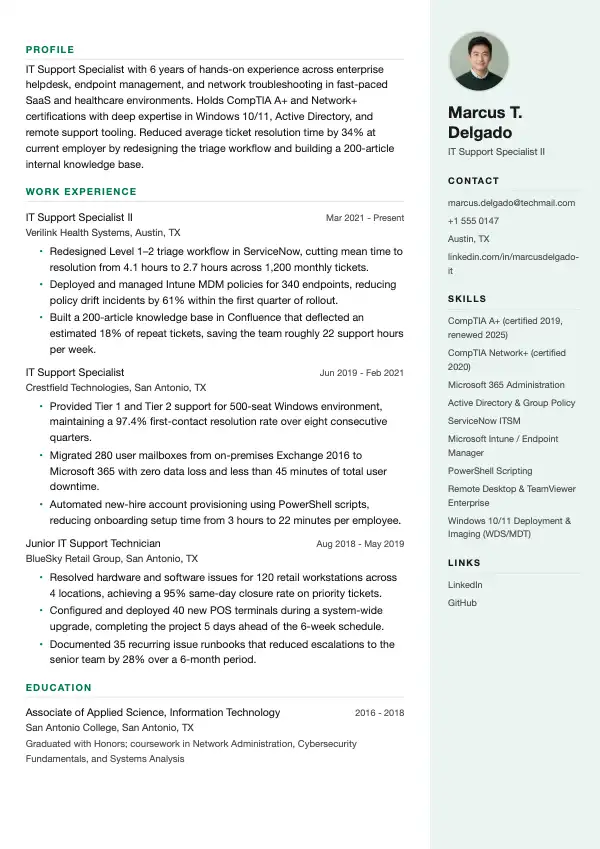
Template: Mist
Read this resume as text
Marcus T. Delgado
IT Support Specialist II
marcus.delgado@techmail.com · +1 555 0147 · Austin, TX · linkedin.com/in/marcusdelgado-it
- Profile
- IT Support Specialist with 6 years of hands-on experience across enterprise helpdesk, endpoint management, and network troubleshooting in fast-paced SaaS and healthcare environments. Holds CompTIA A+ and Network+ certifications with deep expertise in Windows 10/11, Active Directory, and remote support tooling. Reduced average ticket resolution time by 34% at current employer by redesigning the triage workflow and building a 200-article internal knowledge base.
- Work Experience
IT Support Specialist II
Verilink Health Systems, Austin, TX · Mar 2021 - Present
- Redesigned Level 1–2 triage workflow in ServiceNow, cutting mean time to resolution from 4.1 hours to 2.7 hours across 1,200 monthly tickets.
- Deployed and managed Intune MDM policies for 340 endpoints, reducing policy drift incidents by 61% within the first quarter of rollout.
- Built a 200-article knowledge base in Confluence that deflected an estimated 18% of repeat tickets, saving the team roughly 22 support hours per week.
IT Support Specialist
Crestfield Technologies, San Antonio, TX · Jun 2019 - Feb 2021
- Provided Tier 1 and Tier 2 support for 500-seat Windows environment, maintaining a 97.4% first-contact resolution rate over eight consecutive quarters.
- Migrated 280 user mailboxes from on-premises Exchange 2016 to Microsoft 365 with zero data loss and less than 45 minutes of total user downtime.
- Automated new-hire account provisioning using PowerShell scripts, reducing onboarding setup time from 3 hours to 22 minutes per employee.
Junior IT Support Technician
BlueSky Retail Group, San Antonio, TX · Aug 2018 - May 2019
- Resolved hardware and software issues for 120 retail workstations across 4 locations, achieving a 95% same-day closure rate on priority tickets.
- Configured and deployed 40 new POS terminals during a system-wide upgrade, completing the project 5 days ahead of the 6-week schedule.
- Documented 35 recurring issue runbooks that reduced escalations to the senior team by 28% over a 6-month period.
- Education
Associate of Applied Science, Information Technology
San Antonio College, San Antonio, TX · 2016 - 2018
Graduated with Honors; coursework in Network Administration, Cybersecurity Fundamentals, and Systems Analysis
- Skills
- CompTIA A+ (certified 2019, renewed 2025) · CompTIA Network+ (certified 2020) · Microsoft 365 Administration · Active Directory & Group Policy · ServiceNow ITSM · Microsoft Intune / Endpoint Manager · PowerShell Scripting · Remote Desktop & TeamViewer Enterprise · Windows 10/11 Deployment & Imaging (WDS/MDT)
- Links
- LinkedIn · GitHub
What makes this resume work
- The summary names both CompTIA certifications in the first sentence, so they turn up in a recruiter's ATS search and are the first thing a reader sees.
- Every bullet opens with a strong action verb and closes with a specific number — percentages, ticket counts, or time saved — so the impact is impossible to skim past.
- Skills are listed as complete, searchable phrases (e.g., 'Microsoft Intune / Endpoint Manager') rather than single words, matching the exact strings recruiters enter into applicant tracking systems.
- The career progression from Junior Technician to Specialist II is explicit across three roles, demonstrating growth without requiring the hiring manager to do the math.
Keywords that help you pass the ATS
Work the ones that fit your experience into your resume, naturally, not stuffed.
How to write an IT Support Specialist resume
Choose the right format for an IT Support Specialist resume
Use a reverse-chronological format. Hiring managers in IT support want to see your most recent role first because tools, ticketing systems, and environments change fast — a five-year-old helpdesk job tells them less than last year's. Keep the resume to one page if you have under ten years of experience; two pages only if you have extensive enterprise or multi-site experience to justify it.
Set margins to 0.75–1 inch, use a clean sans-serif font like Calibri or Arial at 10–11pt, and avoid tables or text boxes that break applicant tracking systems. Most IT support roles funnel applications through ATS platforms like Workday, Greenhouse, or iCIMS, so a straightforward single-column or mild two-column layout is safer than a heavily designed template.
- Reverse-chronological order, most recent role at the top
- One page for under 10 years of experience
- No text boxes, headers/footers, or graphics that confuse ATS parsers
- File format: PDF unless the job posting explicitly asks for .docx
Write a professional summary that lands interviews
Your summary sits directly below your contact information and should be three to four sentences that immediately signal your tier of support (Tier 1, 2, or 3), your environment (Windows, macOS, hybrid, cloud), and one or two concrete outcomes. Skip objectives like 'seeking a challenging role' — recruiters skip them too.
Example: "IT Support Specialist with 5 years of experience delivering Tier 1 and Tier 2 support across Windows 10/11 and macOS environments for organizations of up to 2,000 endpoints. Proficient in ServiceNow, Jira Service Management, and Active Directory administration. Reduced average ticket resolution time by 22% by building a knowledge base of 80+ documented solutions. CompTIA A+ and Network+ certified."
Write work-experience bullets that show measurable impact
Each bullet should follow an action-verb + task + result structure. Quantify wherever you can: ticket volume, resolution times, uptime percentages, number of users supported, or cost savings. Generic phrases like 'responsible for troubleshooting' waste space. Recruiters spend about seven seconds on a first scan (Ladders eye-tracking study, 2018) — numbers stop the eye.
Pull metrics from ticketing dashboards in ServiceNow, Zendesk, or Freshservice, or from performance reviews. Even rough figures ('approximately 150 tickets per week') are better than none.
- Resolved an average of 140 tickets per week across hardware, software, and network issues with a 94% first-contact resolution rate, exceeding the team benchmark of 85%.
- Deployed and configured 320 Windows 11 workstations during a company-wide refresh using SCCM imaging, completing the project two weeks ahead of schedule and under a $12,000 budget.
Skills and certifications recruiters and ATS systems look for
Build a dedicated skills section using exact terminology from job postings. ATS systems keyword-match against the job description, so if a posting says 'Active Directory' and you wrote 'AD,' you may not rank. List hard technical skills separately from soft skills, and always call out certifications by their full official name.
Certifications carry real weight in IT support hiring. CompTIA A+ is the baseline expectation for most Tier 1 and Tier 2 roles. Network+ and Security+ open doors to network or security-adjacent support positions. Microsoft certifications (MD-102, AZ-900) and ITIL 4 Foundation signal enterprise readiness and process maturity.
- Ticketing systems: ServiceNow, Zendesk, Jira Service Management, Freshservice, Remedy
- Platforms: Windows 10/11, macOS Ventura/Sonoma, iOS, Android, Ubuntu
- Tools: Active Directory, Azure AD / Entra ID, Microsoft 365 Admin Center, SCCM, Intune, TeamViewer, BeyondTrust
- Certifications: CompTIA A+, Network+, Security+; Microsoft MD-102; ITIL 4 Foundation; HDI Support Center Analyst
- Networking basics: TCP/IP, DNS, DHCP, VPN, Wi-Fi troubleshooting
Education, licenses, and extras that strengthen your candidacy
List your highest degree first with school name, degree, and graduation year. An associate or bachelor's degree in Information Technology, Computer Science, or a related field is common, but many employers hire candidates with only a high school diploma plus strong certifications. If your GPA was above 3.5 and you graduated within the last three years, include it; otherwise leave it off.
Add a separate certifications section if you hold more than two — do not bury them in education. Include the issuing body and expiration year where relevant (CompTIA certifications are valid for three years). If you have a home lab, GitHub repo with documented scripts, or volunteer IT work, add a brief 'Projects' or 'Additional Experience' section. These details differentiate candidates who have identical day-job histories.
- List certifications with issuer and expiration: 'CompTIA A+, CompTIA, exp. 2028'
- Include relevant coursework only if you are a recent graduate with limited work history
- Home lab or self-study projects (e.g., built a pfSense firewall, deployed a Windows Server 2022 domain in a VM) belong in a Projects section
Mistakes to avoid
- Listing every tool you have ever touched without context makes it impossible for a hiring manager to gauge your actual proficiency level with any of them.
- Using vague bullets like 'provided technical support to end users' with no ticket volume, resolution rate, or scope tells the recruiter nothing that differentiates you from every other applicant.
- Omitting certifications from the skills section or burying them only in the education block causes ATS systems to miss them during keyword parsing.
- Sending a resume with a generic summary that does not specify your support tier, environment size, or industry means the recruiter cannot immediately place you in the right open role.
Frequently asked questions
- Should I list every certification I have on my IT Support Specialist resume?
- List certifications that are current and relevant to the roles you are targeting. Expired certifications should be removed or noted as expired only if the underlying knowledge is still directly applicable. A focused list of three to five strong credentials reads better than ten that include outdated or unrelated ones.
- How do I write an IT support resume if I have no professional experience?
- Lead with your certifications and any hands-on experience from a home lab, internship, volunteer IT work, or coursework. Describe what you built or supported in specific terms — operating systems, hardware, number of users or devices — rather than just listing class names. Employers hiring for Tier 1 roles routinely consider candidates without paid experience when certifications and demonstrated initiative are present.
- What is the ideal length for an IT Support Specialist resume?
- One page is standard for anyone with fewer than ten years of experience in IT support roles. Two pages are acceptable if you have held multiple distinct positions with different environments, managed large-scale projects, or carry a significant certification portfolio that genuinely requires the space. Never pad to fill a second page.
Make it yours in minutes
Open this example in the builder, swap in your details, and export a clean, ATS-ready resume.
Once your resume is ready
More for this application
- Template style
- Software Engineer resume templates